To check whether existing VBA codes supported by Office 2010 or not,
instead of re-compiling the VBA codes, Microsoft now offering a new inspector for you.
Gray has written a short guide about on how to use the inspector.
If your macros are password protected, remember to unlock it before launching the inspector.
However, this tools is still in beta. I have encountered serveral false alarm about "Range" objects.
As the tools are in beta, you can send any feedback to the development team.
There is also a sweeptakes on bug reporting.
Showing posts with label Office 2010. Show all posts
Showing posts with label Office 2010. Show all posts


2009-12-18
Excel 2010 Object Model Changes
Seems the VBA changes on Excel 2010 has been fixed.
A official comparsion to 2007/2003 could be found here
Luckly, there are no critical changes like FileFind in 2007.
Most of them are related to conditional formatings.
A official comparsion to 2007/2003 could be found here
Luckly, there are no critical changes like FileFind in 2007.
Most of them are related to conditional formatings.
2009-11-29
Office 2010 Beta Activation issue
When there is a problem on activiting the office beta:
"The setup controller has encountered a problem during install. Please review the log files for further information on the error."
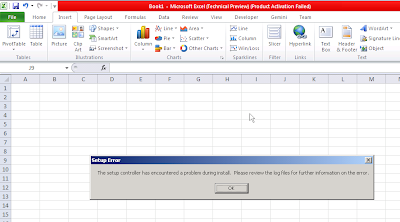
Try the steps below:
1. Launch the setup program "setup.exe" under this location
C:\Program Files\Common Files\microsoft shared\OFFICE14\Office Setup Controller
2. Select "Enter a product key"
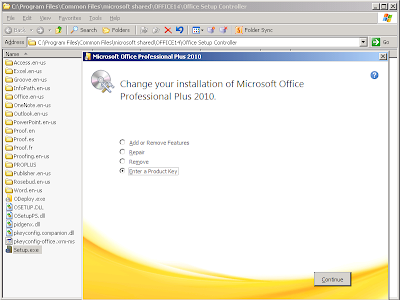
3. Click on continue
4. Wait the excel for re-deploy.... and click OK
5. Launch Excel again (or any Office program you like). This option is now back.
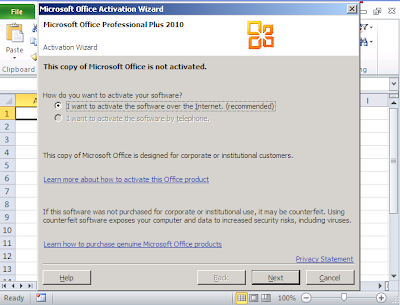
6. Wait again for the activiton. Click close when reaching this screen.
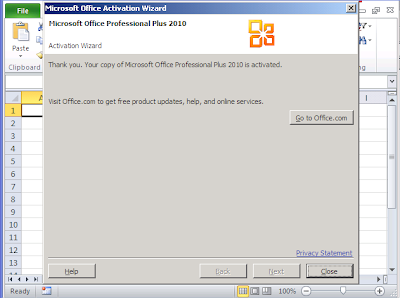
7. Restart the Excel. Finish!
"The setup controller has encountered a problem during install. Please review the log files for further information on the error."

Try the steps below:
1. Launch the setup program "setup.exe" under this location
C:\Program Files\Common Files\microsoft shared\OFFICE14\Office Setup Controller
2. Select "Enter a product key"

3. Click on continue
4. Wait the excel for re-deploy.... and click OK
5. Launch Excel again (or any Office program you like). This option is now back.

6. Wait again for the activiton. Click close when reaching this screen.

7. Restart the Excel. Finish!
2009-08-14
Excel 2010 SSAS Cube Sets.
Following up with SSAS features in Excel 2010
Besides creating sets contain only dimension members or calculated members,
you can them both in the same set:

The magic of the sets could be respected to the new "calculatedmember" property in the connection object:
ActiveWorkbook.connections("...").OLEDBConnection.CalculatedMembers.Add Name:="[Set1]", Formula:= "{....}"
Besides creating sets contain only dimension members or calculated members,
you can them both in the same set:

The magic of the sets could be respected to the new "calculatedmember" property in the connection object:
ActiveWorkbook.connections("...").OLEDBConnection.CalculatedMembers.Add Name:="[Set1]", Formula:= "{....}"
2009-08-13
What's New in Excel 2010 (Web Resources)
0.General
Official free ebook on Office 2010 features:
First look in Microsoft Office 2010
1. SSAS Cube Related:
Frederik Vandeputte's Blog
Measures:
Running Total (Year To End),
Displaying Single Measure Multiple times
Dimensions
Interactive Filter (Instance selection on typing)
Dynamic Sets (A user friendly approach :-) )
Create Set base Rows Items
Write Backs
Chris Webb Blog
Dynamic Sets
Sets Creation with UI
2. How to show everything with sparklines
Excel Team
- Sparklines as LINE
- Formats: Low / High
- "sparklines are in an Excel table you can add another row of data and the sparkline group would grow and add another sparkline to the table"
Excel Team
- Sparklines as column
- Formats: Negative Points and Styles
Excel Team (1)
Excel Team (2)
-Sparklines as winloss
- Sparkines axis and Reference Line
Excel Team
- Line Up Points
3. Conditional Formatting
Excel Team
- Icon set now customizable
- "Exception handling" in icon set, e.g. negative value
Excel Team
- Proportional Value Bar
- Negative value Bar
- Formating Border/Fills
4. Charting
Excel Team
- Interactivity: Fields button (selection of range and "drilldown" easily)
- Double click objects to format (am... is it so important?)
- Data points: limit of data points extended.
5. Security
Excel Team
Should be something related to this one...
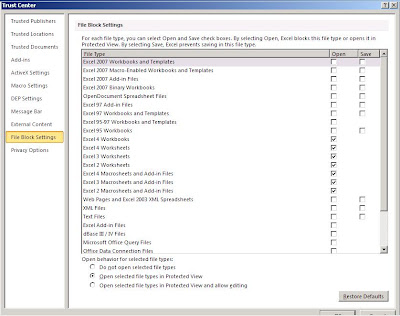
Excel Team
-Protected view for VBA, in control of file access.
General
Overview from Microsoft
Some screenshots in pre-"technical preview"
Official free ebook on Office 2010 features:
First look in Microsoft Office 2010
1. SSAS Cube Related:
Frederik Vandeputte's Blog
Measures:
Running Total (Year To End),
Displaying Single Measure Multiple times
Dimensions
Interactive Filter (Instance selection on typing)
Dynamic Sets (A user friendly approach :-) )
Create Set base Rows Items
Write Backs
Chris Webb Blog
Dynamic Sets
Sets Creation with UI
2. How to show everything with sparklines
Excel Team
- Sparklines as LINE
- Formats: Low / High
- "sparklines are in an Excel table you can add another row of data and the sparkline group would grow and add another sparkline to the table"
Excel Team
- Sparklines as column
- Formats: Negative Points and Styles
Excel Team (1)
Excel Team (2)
-Sparklines as winloss
- Sparkines axis and Reference Line
Excel Team
- Line Up Points
3. Conditional Formatting
Excel Team
- Icon set now customizable
- "Exception handling" in icon set, e.g. negative value
Excel Team
- Proportional Value Bar
- Negative value Bar
- Formating Border/Fills
4. Charting
Excel Team
- Interactivity: Fields button (selection of range and "drilldown" easily)
- Double click objects to format (am... is it so important?)
- Data points: limit of data points extended.
5. Security
Excel Team
Should be something related to this one...

Excel Team
-Protected view for VBA, in control of file access.
General
Overview from Microsoft
Some screenshots in pre-"technical preview"
2009-08-04
Excel 2010 Technical Preview invitation released
Received the invitation finally...

It's include the following applications:
Microsoft Office Professional 2010 (word,Excel,PowerPoint,OneNote,Outlook,Publisher,Access)
Microsoft Visio 2010
Microsoft SharePoint Designer 2010
MicrosoftR InfoPath 2010
MicrosoftR SharePoint Workspace 2010
Business Contact Manager for Microsoft Outlook 2010
Nice that it comes with Japanese language pack
By the way, the product key could not be used with Windows Server...
I need to find another machine for it...

It's include the following applications:
Microsoft Office Professional 2010 (word,Excel,PowerPoint,OneNote,Outlook,Publisher,Access)
Microsoft Visio 2010
Microsoft SharePoint Designer 2010
MicrosoftR InfoPath 2010
MicrosoftR SharePoint Workspace 2010
Business Contact Manager for Microsoft Outlook 2010
Nice that it comes with Japanese language pack
By the way, the product key could not be used with Windows Server...
I need to find another machine for it...
2009-05-30
Excel 2010 "technical preview" Follow up
What's New in Excel 2010
Here are some different that I found it on interface between the 2007 and 2010.
However, I think there should be more in the 2010 release.
In general, there some enhancement on graphics, charts(Sparklines), pivot table (Slicer).
The help there are still in 2007 version.
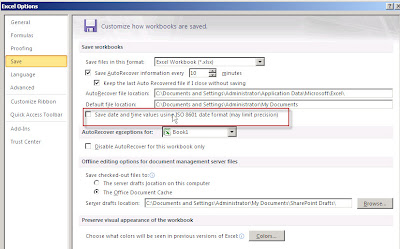
Excel option, date format
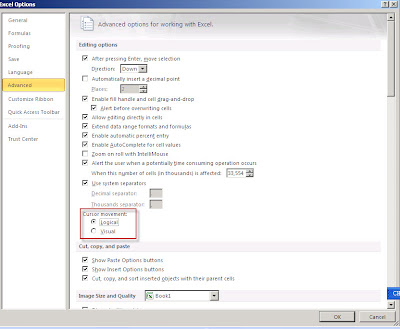
Excel Option Cursor movement (Not sure what it is yet)


Review unsaved draft version of this excel, they put this visually finally..
Here are some different that I found it on interface between the 2007 and 2010.
However, I think there should be more in the 2010 release.
In general, there some enhancement on graphics, charts(Sparklines), pivot table (Slicer).
The help there are still in 2007 version.
Excel option, date format

Excel Option Cursor movement (Not sure what it is yet)

Excel option:Pivot table: Prevent hang when undoing

Excel option: Customizable Ribbon finally...

Review unsaved draft version of this excel, they put this visually finally..


2009-05-23
Excel 2010 images from "technical preview" (2009-05-30 Trial followup)
2009-05-30 update: Technical Preview followup
From the looks, it seems that 2010 is a service pack for Excel. XD


It's something like the below:
Stack 1: Poor Office! Just Over advertised like Windows 7. After using windows 7 for 2 months, I switched back to windows Vista
Stack 2: Poor Office! Just Over advertised like Windows 7. After using windows 7 for 2 months, I switched back to windows XP
...
Stack 3: Poor Office! Just Over advertised like Windows 7. After using windows 7 for 2 months, I switched back to DOS 6.22
Stack 4: Poor Office! Just Over advertised like Windows 7. After using windows 7 for 2 months, I switched back to ENIAC
Stack 5: Poor Office! Just Over advertised like Windows 7. After using windows 7 for 2 months, I switched back to abacus
Stack 6: Poor Office! Just Over advertised like Windows 7. After using windows 7 for 2 months, I switched back to counting with knots
Stack 7: Poor Office! Just Over advertised like Windows 7. After using windows 7 for 2 months, I switched back to counting with fingers
...
From the looks, it seems that 2010 is a service pack for Excel. XD


For non-Excel images, please go C-Net site here
--------------------------------------------
A nice discussion about windows from a Chinese forum about the leak of office

It's something like the below:
Stack 1: Poor Office! Just Over advertised like Windows 7. After using windows 7 for 2 months, I switched back to windows Vista
Stack 2: Poor Office! Just Over advertised like Windows 7. After using windows 7 for 2 months, I switched back to windows XP
...
Stack 3: Poor Office! Just Over advertised like Windows 7. After using windows 7 for 2 months, I switched back to DOS 6.22
Stack 4: Poor Office! Just Over advertised like Windows 7. After using windows 7 for 2 months, I switched back to ENIAC
Stack 5: Poor Office! Just Over advertised like Windows 7. After using windows 7 for 2 months, I switched back to abacus
Stack 6: Poor Office! Just Over advertised like Windows 7. After using windows 7 for 2 months, I switched back to counting with knots
Stack 7: Poor Office! Just Over advertised like Windows 7. After using windows 7 for 2 months, I switched back to counting with fingers
...
2009-05-21
Excel 2010 and SQL2008 R2 Gemini
A screenshot from SQL 2008 R2 Preview


Nice to to see Gemini in SQL08 R2.
So what is Gemini? you may refer it as an upgrade on Analysis Service.
Gemini can handle a large amount of data and relationship in a "lighting" speed.
Anyway, from the points that the add-in is provided for Excel 2010 instead of Excel 2007,
we should see a much more efficient operation with Excel 2010
2009-05-14
Office 2010 Technical Preview
UPDATE 2009-05-29 Follow up
The office 2010 will be available in July
Sign up for technical preview here
http://www.office2010themovie.com/
An interesting discussion about the menu style...
Seems most of the comments are on restoring to 2003s' style.
How about a style change again XD
The office 2010 will be available in July
Sign up for technical preview here
http://www.office2010themovie.com/
An interesting discussion about the menu style...
Seems most of the comments are on restoring to 2003s' style.
How about a style change again XD
2009-05-02
Office 2010 (Office 14) Screenshots
http://www.microsoft.com/presspass/presskits/2010office/imageGallery.aspx
As seen before, there is a "web version", which come from .net framework 3.5.
I think VBA still works but only on local version.

As seen before, there is a "web version", which come from .net framework 3.5.
I think VBA still works but only on local version.

Subscribe to:
Posts (Atom)